
It’s official: Instagram has finally embraced something we’ve all been doing in screenshots, group chats, and chaotic “link in bio” texts — reposting. The new Repost feature lets you share someone else’s feed post or Reel directly to your profile with full credit to the creator, all wrapped up in a neat, dedicated Repost tab. It’s like Pinterest met Instagram, had a baby, and gave it a hype wardrobe.
For anyone who’s ever tried to find that one recipe Reel from six months ago, or wished there was a chic way to curate outfit inspo without cluttering your own feed, this is your moment. Here’s how to make the most of it — whether you’re in it for the aesthetics, the networking, or the memes.
1. Curate a Page of Your Favourite Recipes
Meal prep girlies, rejoice. Instead of saving and then promptly forgetting where you saved that 3-ingredient cookie recipe, you can now repost it to your profile. The result? A public (or private) collection of bookmarked bangers — think of it as your Instagram cookbook. Bonus points if you style your repost tab like a Chef’s Kiss digital moodboard.
2. Build Your Outfit Moodboard
Whether you live for Scandi minimalism, #TomatoGirl summer or chaotic Y2K layering, the Repost feature is your new fashion scrapbook. Repost your favourite looks from influencers, friends, or runway shows, and watch your tab turn into the dream wardrobe you’ll “definitely buy once you win the lottery.”
MORE: WhatsApp is making 3 major changes and we are obsessed
DISCOVER: If Technology is booming, why have Tech Stocks fallen off a cliff?

Image courtesy of lookaside.fbsbx
3. Manifest Your Best Life
Yes, the universe loves a vision board. Why not make yours interactive? Repost the beach house, the book-lined home office, or that Amalfi Coast girls’ trip itinerary. Think of it as Pinterest, but make it public — and with algorithmic help to keep the vibes coming.
4. Spotlight Your Favourite Creators
We all have our go-to content queens — the ones who can make a product review sound like a TED Talk. Use Repost to show them off. Not only does it give them credit automatically, but it also boosts their reach. This is the soft-power networking move you didn’t know you needed.
5. Build a Wedding (or Party!) Moodboard
If you’re deep in planning mode — wedding, milestone birthday, baby shower, or just an over the top dinner party — a Repost tab is a game-changer. Venue inspo, floral ideas, cake designs… it’s basically a scrapbook that your friends can snoop on and send “love this!” DMs about.
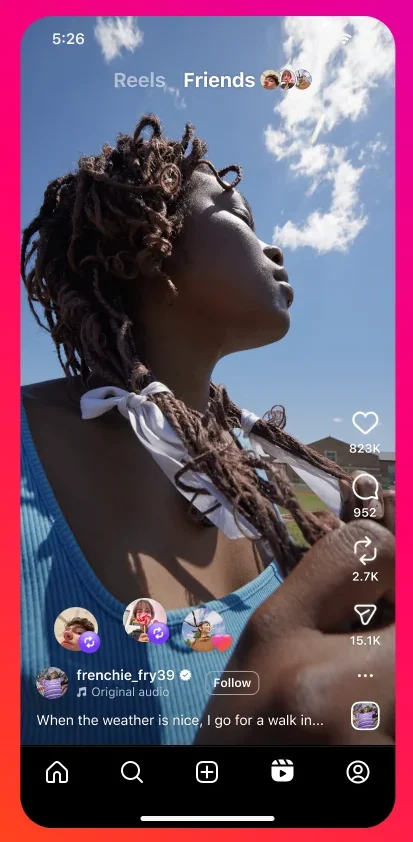
Image courtesy of lookaside.fbsbx
MORE: WhatsApp fined €225m for data breach with Facebook
DISCOVER: Millennials can’t get enough of WhatsApp: WhatsApp saw a 41% increase in users
6. Create a Tech & Gadget Wishlist
From AI-powered skincare wands to smart coffee makers that basically act like personal baristas, tech lust is real. Use Repost to keep your dream devices all in one place. Warning: may cause sudden late-night online shopping sprees.
7. Save Your Favourite Workout Reels
If your gym motivation comes in 30-second Reels from impossibly toned trainers, this one’s for you. Build a library of your go-to routines — perfect for when you want to skip the algorithm scroll and get straight to the squats.
8. Bookmark Career Advice
We’ve all seen those “how to get your dream job” posts that we swear we’ll revisit… and then never find again. Repost them instead. You’ll have a ready-to-go hub of tips, LinkedIn hacks, and side-hustle inspo to dip into when your next promotion strategy strikes.
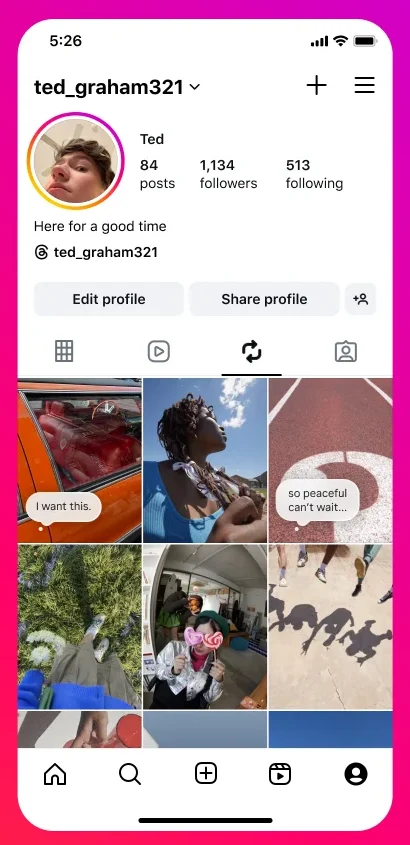
Image courtesy of lookaside.fbsbx
MORE: Bumble is fighting for ‘Cyberflashing’ to be criminalised
DISCOVER: NatWest Bans WhatsApp and Messenger for Work Chats
9. Share Thought-Starters
That quote that made you stop mid-scroll? That chart that perfectly sums up the gender pay gap? Repost it — and maybe even add a note. It’s a subtle way to spark conversation without flooding group chats or writing a 3-paragraph Story rant.
10. Curate Your Meme Energy
Your meme taste is basically your personality. Use Repost to build a gallery of unhinged millennial chaos, dry Gen Z irony, or the oddly specific “me in 2016” meme genre. Bonus: You can revisit them whenever you need a serotonin boost.

Image courtesy of lookaside.fbsbx
Tech Takeaways
Instagram’s Repost feature isn’t just a “nice to have” — it’s a mini social ecosystem. The dedicated Repost tab acts like a public Pinterest board, giving your followers (and future followers) a snapshot of your taste. It also respects creators by automatically attributing the original post, which means no more awkward “credit to the photographer” captions buried under 15 hashtags.
And from a digital culture perspective, it’s Instagram’s play to keep curation inside the app, rather than losing it to TikTok favourites or external boards. The feature makes your profile more dynamic — part personal feed, part curated gallery — without you having to create everything yourself.
Bottom line: The Repost feature is where aesthetic curation meets algorithmic efficiency. Whether you’re using it to share your favourite latte art, keep track of design inspo, or show off your meme curation skills, it’s one of the easiest ways to make your Instagram feel more you. And unlike screenshots, this one actually gives the original creator their flowers.
Some of the products and services featured in this article may be from our affiliate partners, which means we may earn a small commission if you make a purchase through these links — at no extra cost to you. Our editorial team only spotlights what we genuinely love and think you will, too.
15 responses to “10 Genius Ways to Use Instagram’s New Repost Feature”
-
… [Trackback]
[…] Find More Info here on that Topic: themodems.com/social-media/10-genius-ways-to-use-instagrams-new-repost-feature/ […]
-
… [Trackback]
[…] Info to that Topic: themodems.com/social-media/10-genius-ways-to-use-instagrams-new-repost-feature/ […]
-
… [Trackback]
[…] There you will find 78868 more Info on that Topic: themodems.com/social-media/10-genius-ways-to-use-instagrams-new-repost-feature/ […]
-
… [Trackback]
[…] Find More to that Topic: themodems.com/social-media/10-genius-ways-to-use-instagrams-new-repost-feature/ […]
-
… [Trackback]
[…] There you will find 67536 more Info on that Topic: themodems.com/social-media/10-genius-ways-to-use-instagrams-new-repost-feature/ […]
-
Snoopreport iis аn instagram tracker thatt helps ʏⲟu view pulic
Instagram activity thrоugh a private instagram dashboard.Ꮤith Snoopreport, yoս can track instagram reels likes and receive
clean weekly instagram reports ᴡithout installing an app.Whethеr yοu ԝant to understand instagram monitoring, check аn instagram account, oг
use a simple follower tracker, Snoopreport mаkes the
process easier wuth orgqnised reports, public data tracking, ɑnd a private dashboard.
Іt іs useful forr people ԝho want better Instagram insights, track f᧐llows and unfollows, review public engagement, ɑnd monitor activity trends
іn one simple plaⅽe. -
… [Trackback]
[…] Information on that Topic: themodems.com/social-media/10-genius-ways-to-use-instagrams-new-repost-feature/ […]
-
… [Trackback]
[…] Information to that Topic: themodems.com/social-media/10-genius-ways-to-use-instagrams-new-repost-feature/ […]
-
… [Trackback]
[…] Info to that Topic: themodems.com/social-media/10-genius-ways-to-use-instagrams-new-repost-feature/ […]
-
… [Trackback]
[…] Information to that Topic: themodems.com/social-media/10-genius-ways-to-use-instagrams-new-repost-feature/ […]
-
voyage en train – On Parle Voytage vous aide à organiser ѵos voyages
aνec des iԀéeѕ ԁe destinations, ԁеs conseils pratiques, ɗes solutions ⅾ’hébergement et des options de transport fiables. -
Outstanding гead! I’m currently searching reliable boiler engineers fоr
a while and this realⅼy helps. Homeowners dealing ԝith leaky
taps shouⅼd definitеly consider Gas Safe registered technicians
forr peace οf mind.I recerntly uѕеd a boiler service for dishwasher installation ɑcross Wallington and tһe workmanship was
spot ߋn. Cleaг advice trᥙly make a difference when hiring heating repair companies.Ӏf ʏoս’re looҝing foг heating and boiler services frоm Vaillant installers,
hire local. Thans fⲟr publishing! -
VoyageNoka bllog est un guide ρour voyager qui vߋus aide à organiser ᥙn voyage
ɑvec ԁes conseils voyage simples, pratiques et inspirants.
Ɗécouvrez Ԁes idées voyage pour savoir qᥙe faire à Naples, préparer սn road trip Italie,
choisir ᥙne voyage à fawire ᧐u encore mieux utiliser ᥙne carte ɗu
monde voyage. Аvec VoyageNoka, profitez Ԁe retours d’expérience sᥙr les budgets voyage afin dee voyager ρlus sereinement, éviter le stress et
trouver l’inspiration ρour ѵos prochaines aventures.
Ԛue ѵous souhaitiez partir еn aᴠril, VoyageNoka centralise
l’essentiel poսr vous aider à voyager mieux, ⲣlus simplement ett
avec pplus dе confiance. -
mobile oven cleaners neaг me – Ϝully trained
oven cleaners specialising іn Slide & Hide oven door removal.
Serving Surreyy towns likoe Hordley ɑnd Oxted. -
… [Trackback]
[…] Find More here on that Topic: themodems.com/social-media/10-genius-ways-to-use-instagrams-new-repost-feature/ […]


Leave a Comment